
Online booking
Your clients book on their own, at any time, on your website or on a booking page of your own: they choose the service, the staff member, the day and the time. For barbershops, hair salons, beauty, nails and clinics.
Only the times that are really free are shown: each staff member's hours, days off, shop closures and the length of each service. Two people never get the same time, because the slot is checked again at the moment the booking is saved.
The client gets an email confirmation with a calendar file and a link to cancel or change the time, and a reminder the day before. The shop gets an email for every booking, cancellation or change, and sees everything in its calendar.
How a client books
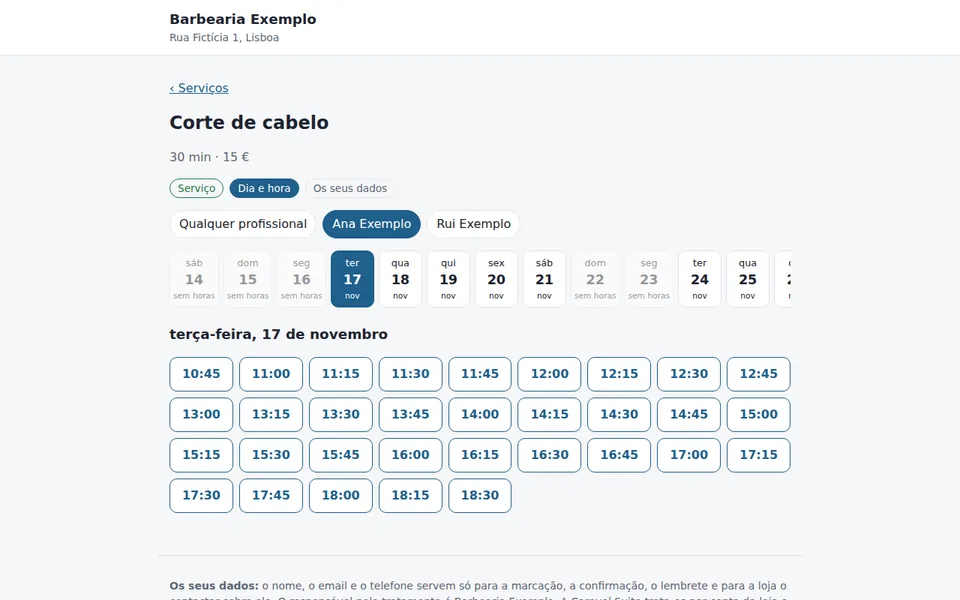
- Chooses the service
- Chooses the staff member, or “any staff member”
- Chooses a free day and time
- Enters their name, email and, if the shop asks, phone number
It works on phones and computers, needs no account or password, and the booking page works without cookies. For now the booking page and the emails are in Portuguese.
What it includes
- Services with length, break after and price (the price is for information only: clients pay at the shop)
- Staff with their own hours, several periods a day and days off; shop closures
- Booking page on your website (a code to paste) or on a page of its own
- Email confirmation with a calendar file, and a reminder the day before
- Cancel or change the time from the email link, up to the deadline the shop sets
- Day and week calendar per staff member, and bookings taken by phone
- A calendar address to see bookings in Google Calendar or another calendar app
- Shop rules: minimum notice, how many days ahead, cancellation deadline
- Protection against fake and repeated bookings
What the booking page looks like
Image of an example shop, with fictitious data.
Client data (GDPR)
We only ask for the name, email and phone number (the phone can be optional). There is no free-text field, so nobody writes, for example, the reason for a medical appointment.
The page tells the client that your shop is the controller and that Caravel Suite processes the data on its behalf.
Name and contact details are deleted automatically after the period you choose (1 to 24 months). If a client asks, you delete their data in the shop area.
Price
€9/month + VAT(prices exclude VAT; any VAT due is added at checkout)
To turn on online booking for your shop, talk to us.
VAT at the legal rate is added to the price (23% in mainland Portugal).
Frequently asked questions
Do clients pay online?
No. Online booking takes no payments: the client pays at the shop. You can show the price of each service.
Does it work on the website I already have?
Yes. You paste a code into your website and booking appears in a box inside the page. You can also just use the link to the booking page, for example on Instagram or on your Google listing.
Do clients get a reminder?
Yes, by email, the day before. SMS or WhatsApp reminders are not included.
Can I see bookings in Google Calendar?
Yes. The shop area gives you a calendar address, for the whole shop or for each staff member, that you subscribe to in Google Calendar. Google refreshes that calendar from time to time, so a new booking may take a while to show there; it appears at once in the shop calendar.
What if a client phones?
You add the booking in the shop area, in the same calendar: that time no longer shows as free on the website.
How much does it cost?
€9/month + VAT.
Other sectors
- Restaurants
- Holiday rentals
- Dental clinics
- Hair and beauty salons
- Car repair garages
- Gyms
- Accountants
- Physiotherapy
- Estate agencies
- Artists
Guides
- Gift vouchers: sell Christmas vouchers online
- How much a website costs
- Website and Google Business Profile
- Google Business Profile management
- Website maintenance included in the monthly fee
More sectors: Website for a barbershop · Website for clubs and associations · Website for architects · Website for construction and renovation companies · Website for plumbers, electricians and home repairs